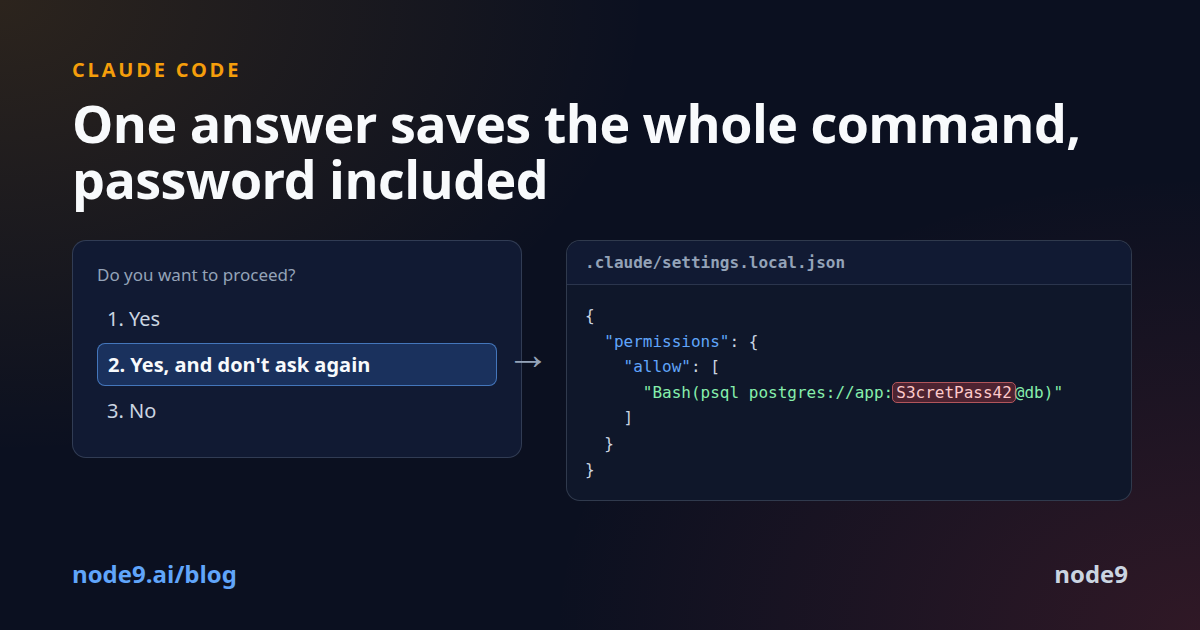
Claude Code asks before it runs a shell command. One of the answers is "Yes, and don't ask again". It is the answer most of us pick for npm test, and it is the one this post is about.
What the answer does
When you choose it, Claude Code writes a rule to .claude/settings.local.json at the root of the repository, so the command runs without a prompt in every later session there. The rule is the command itself. For npm test it looks like this:
{
  "permissions": {
    "allow": ["Bash(npm test *)"]
  }
}
Now picture the command being psql postgres://app:S3cretPass42@db.example.com/app -c "select 1". The rule saved is that whole string, password included. It sits in a JSON file inside your project, and nothing marks it as a secret. It just looks like a permission.
How it reaches GitHub
Claude Code tries to keep the file out of git. The first time it writes the file in a repository that does not already ignore it, it adds **/.claude/settings.local.json to your global git ignore file. That is a sensible default, and it has three holes:
- It lives on your machine, not in the project. A teammate, a CI runner or your next laptop does not have it.
- It does nothing for a file that git already tracks, which is what happens when someone committed
.claude/before the ignore existed. - It does not cover a folder you turn into a repository later.
Apiiro looked at the result. They scanned 104,185 public copies of .claude/settings.local.json on GitHub and found real-looking secrets in 1,122 of them. Counting git history and related settings files, that was 2,539 secrets across 1,994 repositories: 379 database passwords, 43 SSH logins, 42 GitHub, GitLab and npm tokens, 23 AWS keys. In 539 repositories, the commit that changed the file was co-authored by Claude. The researchers did not try any of the credentials. One company confirmed its exposed key was live.
Check your own repositories
The file is JSON, so you can read what it saved:
jq -r '.permissions.allow[]?' .claude/settings.local.json
Read the list. A line with a password, a token or a key in it is a secret stored in plain text in your project. To check whether git tracks the file:
git ls-files --error-unmatch .claude/settings.local.json
If that prints the path, the file is in your history.
Fix it
-
Stop tracking the file and ignore it in the project itself, so the rule travels with the repository:
git rm --cached .claude/settings.local.json echo ".claude/settings.local.json" >> .gitignore -
If a secret was ever pushed, rotate it. Removing it from the current commit does not remove it from history, and history is what scanners read.
-
Stop putting secrets in the command text in the first place. Set them in your shell before you start the agent, or keep them in a credentials file the tool reads itself. Writing
AWS_SECRET_ACCESS_KEY=... aws s3 lsdoes not count: the secret is still part of the command, and the command is what gets saved. A command without a secret in it saves a harmless rule.
The step that matters
The leak happens at the end, on git push, but the mistake happens at the start: a secret typed into a command that an agent is about to run. That is the step where a check can still see it. We tested node9 with a fresh default configuration on three such commands. A database connection string was blocked before it ran. A curl with a bearer token was held for review, and so was an AWS secret key assigned inline in front of aws s3 ls. In each case the secret was visible at the moment of the command, and that is where it has to be caught, before any tool saves it anywhere.
We keep a record of incidents like this one, each with its sources, at node9.ai/incidents.
Sources
- Apiiro, November 5, 2026
- The Hacker News, November 7, 2026
- Claude Code documentation: Configure permissions and Settings files and precedence